
Write a script
This guide shows you how to write a JavaScript file (.js or .jsx) that runs VectorCraft’s commands on the open documents, and how to run it from the app, from vectorcraft-cli or from a Model Context Protocol (MCP) client. To add scripts to the File → Scripts menu, answer their questions and read the Script Console, see Run scripts.
Write your first script
Section titled “Write your first script”-
Create a text file named
lantern.jsxin any folder, and save it as UTF-8. -
Add these lines:
#target vectorcraftvar lantern = vc.run("shape.ellipse", { x: 100, y: 100, width: 28, height: 36 });vc.run("paint.setFill", { ids: [lantern.id], color: "#F59E0B" });$.writeln("Drew lantern " + lantern.id); -
Open a document in VectorCraft.
-
Choose File → Scripts → Other Script…, or press Ctrl+F12 (Cmd+F12 on macOS). Choose
lantern.jsx, and click Run in the Run Script warning. The warning does not appear when Show External Script Warning is off in Edit → Preferences… → General (on macOS, VectorCraft → Settings → General…). -
Choose Window → Script Console to read the line the script wrote.
The script draws an amber ellipse. A run that finishes adds one undo step, Run Script, to each document it changed, so Ctrl+Z (Cmd+Z on macOS) undoes the whole run.
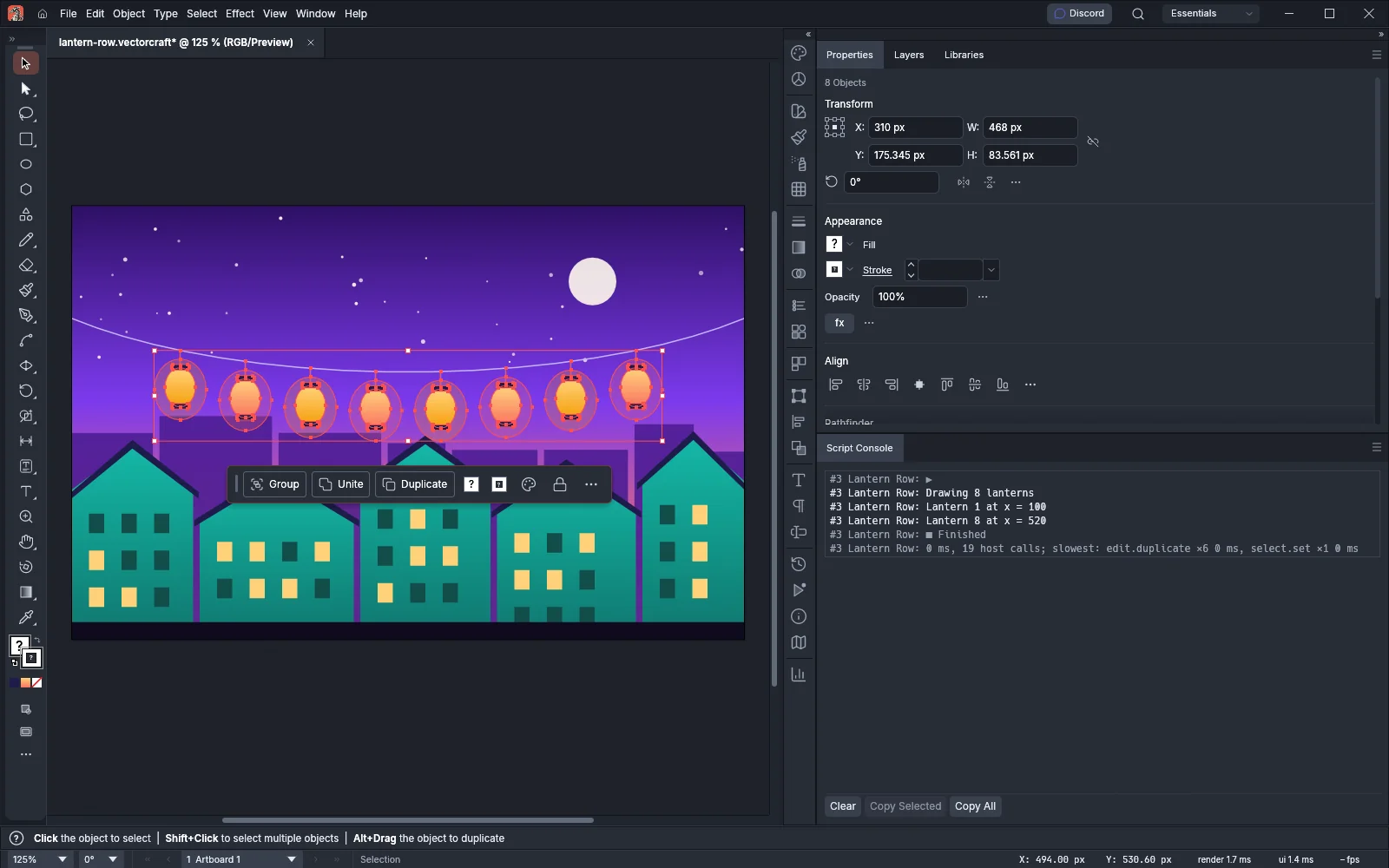
In the following image, the script lantern-row.jsx copied a selected amber lantern and coral lantern along a string until eight lanterns hang across the document. It then selected the lanterns and wrote three lines to the Script Console.
Run commands with vc.run
Section titled “Run commands with vc.run”vc.run(id, params) runs one VectorCraft command and returns its result. id is the command’s id as a string. params is an object of the command’s parameters, and you can leave it out when the command needs none.
var rect = vc.run("shape.rectangle", { x: 10, y: 10, width: 20, height: 20 });// rect is { id: 2 }: the id of the new rectanglevc.run("select.set", { ids: [rect.id] });vc.run("select.all");- The result is the same value the command returns anywhere else, such as
{ id }for a new shape. Pass the ids it gives to later commands. - Each command checks its own parameters and is enabled or disabled as it is in the menus. Most commands act on the selection when you do not give
ids. - To find a command’s id and parameters, read
vc.commandsin the script, runvectorcraft-cli commands, or choose Help → Search Commands…. See Automate VectorCraft. vc.runthrows aTypeErrorwhen the id is not a string (“vc.run: give a command id, as a string”), when the parameters are not an object (“vc.run: the parameters must be an object”), or when you give more than two arguments.- A result larger than 64 levels, 16 MiB or 1,048,576 entries throws a
RangeError, and VectorCraft puts that command’s changes back.
Handle a command that fails
Section titled “Handle a command that fails”A command that fails throws an Error whose message says what went wrong. VectorCraft puts back the documents and the session state that the command changed, so the script can catch the error and go on:
try { vc.run("object.move", { ids: [99999], dx: 10, dy: 0 });} catch (e) { $.writeln("Skipped: " + e.message); // Skipped: invalid parameters for `object.move`: no such object id 99999}When the script does not catch an error, the run ends with Ended with an error, and every open document goes back to how it was before the run. In both cases, files that a command saved or exported stay on disk. The failed command’s error message names the files it wrote, and for an error the script does not catch, the message that ends the run names them.
A script cannot catch these, and each one ends the run and puts the documents back:
- A click on Stop in the status bar or in a dialog.
- An internal fault in VectorCraft.
- A limit on the run, such as its 2,000,000 calls to VectorCraft. Run scripts lists the limits.
Read the document
Section titled “Read the document”vc.document is a snapshot of the active document, taken each time the script reads it. It is null when no document is open.
| Property | What it holds |
|---|---|
name |
The document’s name, as its tab shows it |
path |
The file the document was opened from or saved to, or null for a document that has not been saved |
modified |
true when the document has unsaved changes |
artboards |
The number of artboards |
layers |
The number of top-level layers |
selection |
The ids of the selected objects, up to the first 1,000 |
selectionCount |
The number of selected objects |
var doc = vc.document;if (doc === null) { alert("Open a document first.", "Lantern Row", true);} else if (doc.selectionCount === 0) { alert("Select the lanterns to recolor.", "Lantern Row");}vc.commands lists every command a script can run. Each entry has the command’s id, its label as the menus show it, and params, a text description of its parameters.
Write to the Script Console
Section titled “Write to the Script Console”| Function | What it writes |
|---|---|
$.write(value, ...) |
Each value as text, one after another, without ending the line |
$.writeln(value, ...) |
The same as $.write, then ends the line |
vc.log(value) |
One line in the Script Console. A value that is not a string is written as JSON, for example {"done":true}. The value also goes in the run’s report, in its log list. |
A run can add up to 10,000 vc.log entries and 4 MiB of them. Past either limit, vc.log throws a RangeError. Each line in the Script Console starts with the run’s number and the script’s name. See Read a script’s output in the Script Console.
Ask the person running the script
Section titled “Ask the person running the script”| Call | Buttons | Returns |
|---|---|---|
alert(message, title, errorIcon) |
OK, Stop | undefined |
confirm(message, noAsDflt, title) |
Yes, No, Stop | true for Yes, false for No |
prompt(message, preset, title) |
OK, Cancel, Stop | The text in the field for OK, null for Cancel |
- Only
messageis required, except thatpromptalso requirespreset, the text its field starts with. titleis the dialog’s title. Without one, the title is Script Alert.errorIconset totrueshows a red ! beside the alert’s message.noAsDfltset totruemakes No the highlighted button, which Enter clicks.- The script waits at the call until the person answers. Stop ends the script and undoes everything it did.
- A message can be up to 16 KiB, a title 256 bytes and a preset 16 KiB. Longer text throws a
RangeError. - A dialog cannot open inside a function that a built-in calls back, such as an
Array.prototype.sortcomparison, inside a getter or a conversion, or inside a file that$.evalFileruns. A call there throws an error.
if (!confirm("Replace the 8 lanterns on this layer?", true, "Lantern Row")) { // The person clicked No, or pressed Esc}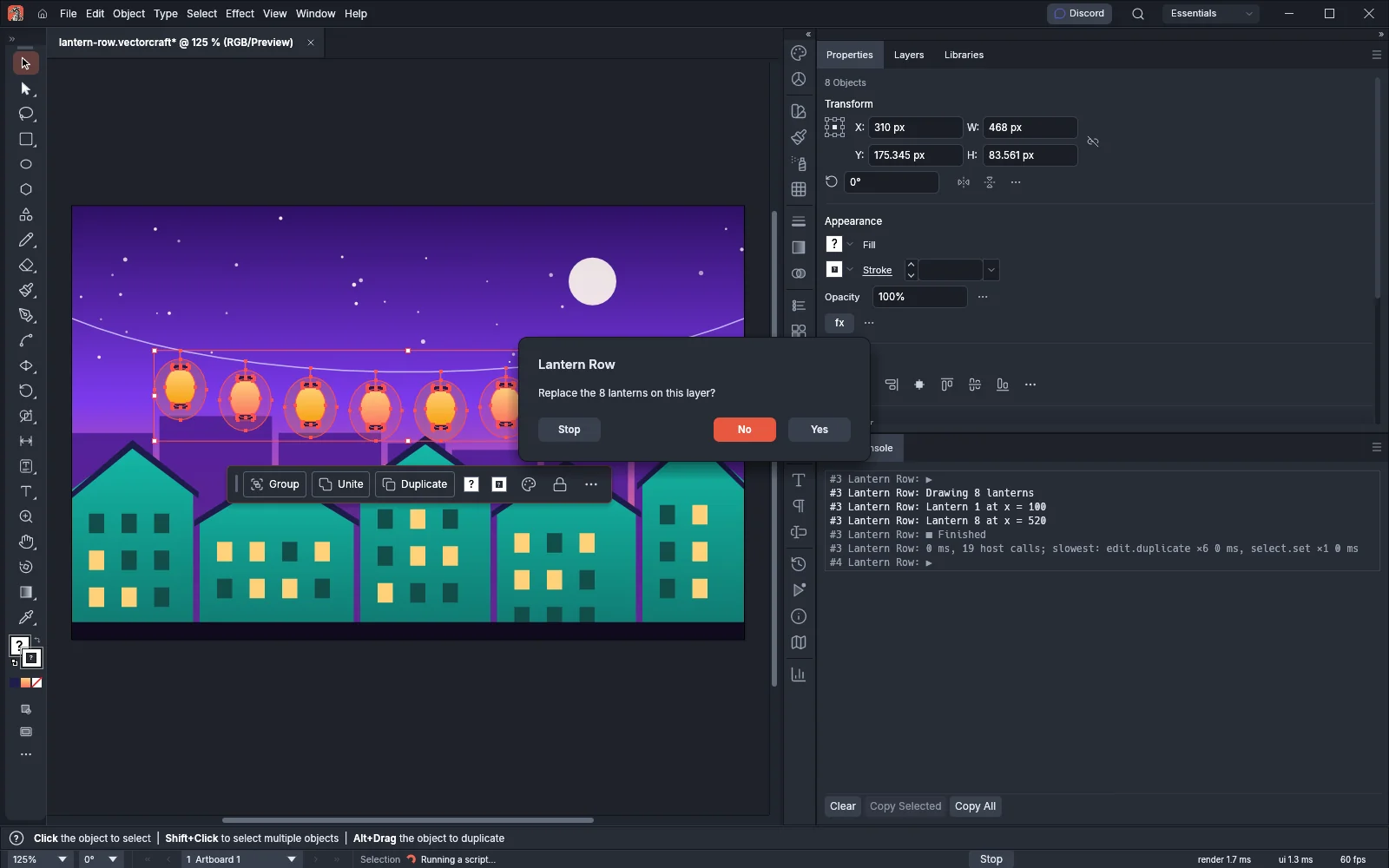
Pass values to a script
Section titled “Pass values to a script”vc.args holds the args object that the run was started with. A script run from the File → Scripts menu gets an empty object, so give each value a default:
var count = vc.args.count || 8;To pass values, run the script with the script.run command and an args object of up to 1 MiB as JSON. See Run a script without a window.
To check what the running version of VectorCraft offers, read vc.api.version, which is "1.0" in VectorCraft 0.24.1, or call vc.api.has(name). vc.api.has returns true for run, document, commands, log, args, console, dialogs and dollar, and false for any other name.
Read files next to the script
Section titled “Read files next to the script”A script can read files with File and Folder inside its own folder and the folders below it. When VectorCraft or vectorcraft-cli mcp was started with --automation-read-root folders, a script reads only where its own folder and those folders overlap. A relative path starts at the script’s folder. In the web version of VectorCraft, every file lookup fails.
var notes = new File("notes.txt");if (notes.exists && notes.open("r")) { var title = notes.readln(); // the first line var rest = notes.read(); // everything after it notes.close();}var texts = Folder($.fileName.replace(/[\\/][^\\/]*$/, "")).getFiles("*.txt");| Member | What it does |
|---|---|
exists, length, created, modified |
The file’s state, size in bytes and dates |
getFiles(mask) |
On a Folder, lists up to 2,048 entries sorted by name. A mask uses * and ? and ignores case. A function that takes each entry and returns true or false also works as a mask. |
resolve() |
The path with links and .. resolved |
open("r") |
Opens the file for reading and returns true |
read(), readln(), readch() |
Reads the rest of the file, the next line, or the next character |
seek(pos), tell() |
Sets and returns the position in bytes |
close() |
Closes the file |
- A path outside the script’s folder, a network or device path, and a link that leads outside give
falseornull, and the object’serroris “Script file access denied”. - A file can be up to 8 MiB, and a run can read up to 32 MiB of files in all.
- Writing, copying, renaming and deleting files through
FileandFolderis not available. These calls returnfalseornulland seterror, for example to “Script file writing is not available”. To write a file, run a command that saves or exports, such asfile.export. - A script given as text, with
sourceinstead ofpath, cannot read any file. - VectorCraft reads a file in the encoding its byte order mark names (UTF-8, UTF-16LE or UTF-16BE), otherwise in the encoding the script set, otherwise as UTF-8 when the bytes are valid UTF-8, and otherwise as Windows-1252.
The $ object describes the run:
| Member | What it gives |
|---|---|
$.fileName |
The path of the script file, or an empty string for a script given as text |
$.evalFile(path) |
Runs another file in the same global variables and returns its last value. The path is relative to the file being run, and the file must be inside the script’s folder. |
$.includePath |
The folders that the last #includepath line set |
$.engineName |
The name that #targetengine gave, or VectorCraft without one |
Directives
Section titled “Directives”A directive is a line that begins with # or //@, outside strings and comments. VectorCraft reads the directives before the script runs.
| Directive | What it does |
|---|---|
#include "file.jsx" or //@include "file.jsx" |
Inserts another file in place of the line. See What a script can change. |
#includepath "folder" |
Sets the folders that #include searches after the folder of the including file. A later #includepath line replaces the list. |
#script "Name" |
Names the run. The Script Console, error messages and the run’s report use this name instead of the file name. |
#target name |
VectorCraft accepts the line with any value and ignores it. |
#strict on |
Makes the script throw a TypeError when it assigns to a read-only property or a property that has only a getter, or adds a property to an object that is not extensible (after Object.preventExtensions, Object.seal or Object.freeze), or to vc or $. It does not turn on the rest of strict mode; use 'use strict' for that. |
#strict off |
Turns those checks off. The last #strict line of the script and its included files sets the whole run. Without one, the checks are off. |
#targetengine name |
Runs the script in a named engine. See Keep values between runs. |
VectorCraft stops a script that has an #engine line (“unsupported script directive”) or a # line with any other name (“unknown script directive”). A //@ line with any other name is a comment.
Commands a script cannot run
Section titled “Commands a script cannot run”A script cannot run commands that change something outside the documents. vc.run throws an Error such as “a script cannot run prefs.set” for these commands, and the script can catch it. vc.commands leaves them out.
| Kind | Commands |
|---|---|
| Whole groups | Every command whose id starts with script. (except script.check), plugin., prefs., actionSet., shortcutSet., help., print., library., importMatches., edit.undoGroup., file.recovery. or stroke.widthProfile. |
| Presets | Commands that save, import or delete a preset |
| Fonts and links | text.addFontFiles, text.findFontFiles, text.rescanFonts, links.findFiles, file.place.queue |
| Color and proofing | color.loadProfile, color.removeProfile, view.proofSetup, view.proofColors, view.overprintPreview, view.separationsPreview |
| Other | file.print, edit.clearHistory |
While a script runs, you cannot edit, select or save the documents, and other programs’ commands that change anything end with a busy error.
Keep values between runs
Section titled “Keep values between runs”A script that starts with #targetengine name runs in an engine of that name. The engine keeps the script’s global variables and functions, and the next run that names the same engine finds them:
#targetengine "lanterns"
if (typeof runs === "undefined") runs = 0;runs++;$.writeln("Run " + runs + " in " + $.engineName);- The name is letters, digits and
_, not starting with a digit, or a quoted name of 1 to 64 bytes. Names are compared as written. - The line must be in the script itself, only once, before the first line of code and before any
#includeline. Comments, blank lines and other directives can come before it. - A script without the line, or with
#targetengine main, starts with new global variables each time. - A session keeps up to eight named engines, each with up to 64 MiB of memory. A script that names a ninth engine stops with an error that tells you to drop one with
script.engine.drop. - When a run ends with an error, a limit or Stop, the documents go back, but the engine keeps the global variables that the run set.
- Named engines are not available in the web version of VectorCraft.
- An engine lasts until VectorCraft quits, or until you drop it.
The script.engines command lists the named engines, with each one’s name, its memory in heapBytes and whether a run is using it. script.engine.drop with {"name": "lanterns"} drops an engine and its global variables, and the next run that names it starts fresh. You cannot drop main or the engine of the running script. Run these two commands from an MCP client connected to the app, or as steps of the same vectorcraft-cli run that runs the scripts.
Run a script without a window
Section titled “Run a script without a window”The script.run command runs a script in the session that receives it. vectorcraft-cli run runs it without a window:
cd ~/Art/lanternsvectorcraft-cli run --in lantern-row.vectorcraft --cmd script.run --params '{"path":"lantern-row.jsx","args":{"count":6}}' --export lantern-row.pngIn Windows PowerShell 5.1, put the parameters in a variable and escape each inner double quote with a backslash:
cd ~\Art\lanterns$params = '{\"path\":\"lantern-row.jsx\",\"args\":{\"count\":6}}'vectorcraft-cli run --in lantern-row.vectorcraft --cmd script.run --params $params --export lantern-row.pngscript.run takes these parameters:
| Parameter | What it does |
|---|---|
path |
The .js or .jsx file to run. A relative path starts at the current folder. |
source |
The script’s text, instead of path. Give one of the two. |
name |
The name for errors and the report. The default is the script’s #script line, else the file name, else script. |
args |
An object the script reads as vc.args, up to 1 MiB as JSON |
answers |
The answers to the script’s dialogs, in order, for a run with nobody to answer them: {"kind": "alert", "value": "ok"}, {"kind": "confirm", "value": true} or false, and {"kind": "prompt", "value": "text"} or null. Up to 10,000 answers and 1 MiB as JSON. |
maxFuel |
The number of instructions the script may run, from 1 to 100,000,000,000. The default is 1,000,000,000. |
{"path": "lantern-row.jsx", "answers": [{"kind": "confirm", "value": true}], "maxFuel": 5000000000}A run with nobody to answer its dialogs takes the next answer from answers for each dialog. The run ends with an error when no answer is left (“confirm: answers has no answer left for this dialog”), when the next answer is for another kind of dialog, or when the script finishes with answers left over. In the app, answers is refused, because the person answers the dialogs.
vectorcraft-cli prints the run’s report as JSON. The report lists the documents the script changed (changed), the files its commands wrote (written), its log values, its Script Console lines (console), each dialog and its answer (dialogs), the instructions it used (fuelUsed), its calls to VectorCraft (hostCalls), how long it took (runTimeMs) and its slowest commands. A run that fails stops vectorcraft-cli with the error, its line and its column.
From an MCP client, call the run_command tool with command set to script.run and the same parameters in params. A headless server returns the report at once. In a server connected to the app, script.run returns {"running": true, "name": "..."}, the person answers the dialogs in the window, and when the run ends, the client reads the report in the scriptReport field of the ui_inspect tool’s result (the app’s ui.inspect method). See AI agents and Drive VectorCraft from an MCP client.
For a series of commands that needs no loops or conditions, a steps file is simpler than a script. See Write command steps for vectorcraft-cli.